Studio management software

Run the studio, not the spreadsheet.

Stencil keeps the day board, the client, the deposit, the consent form and the Instagram thread the booking came out of in one place. Built for tattoo studios, around the chair rather than the user.
  • Set it up yourself, in an afternoon
  • Each studio's records isolated at the database level
  • No pricing yet
Calendar — week
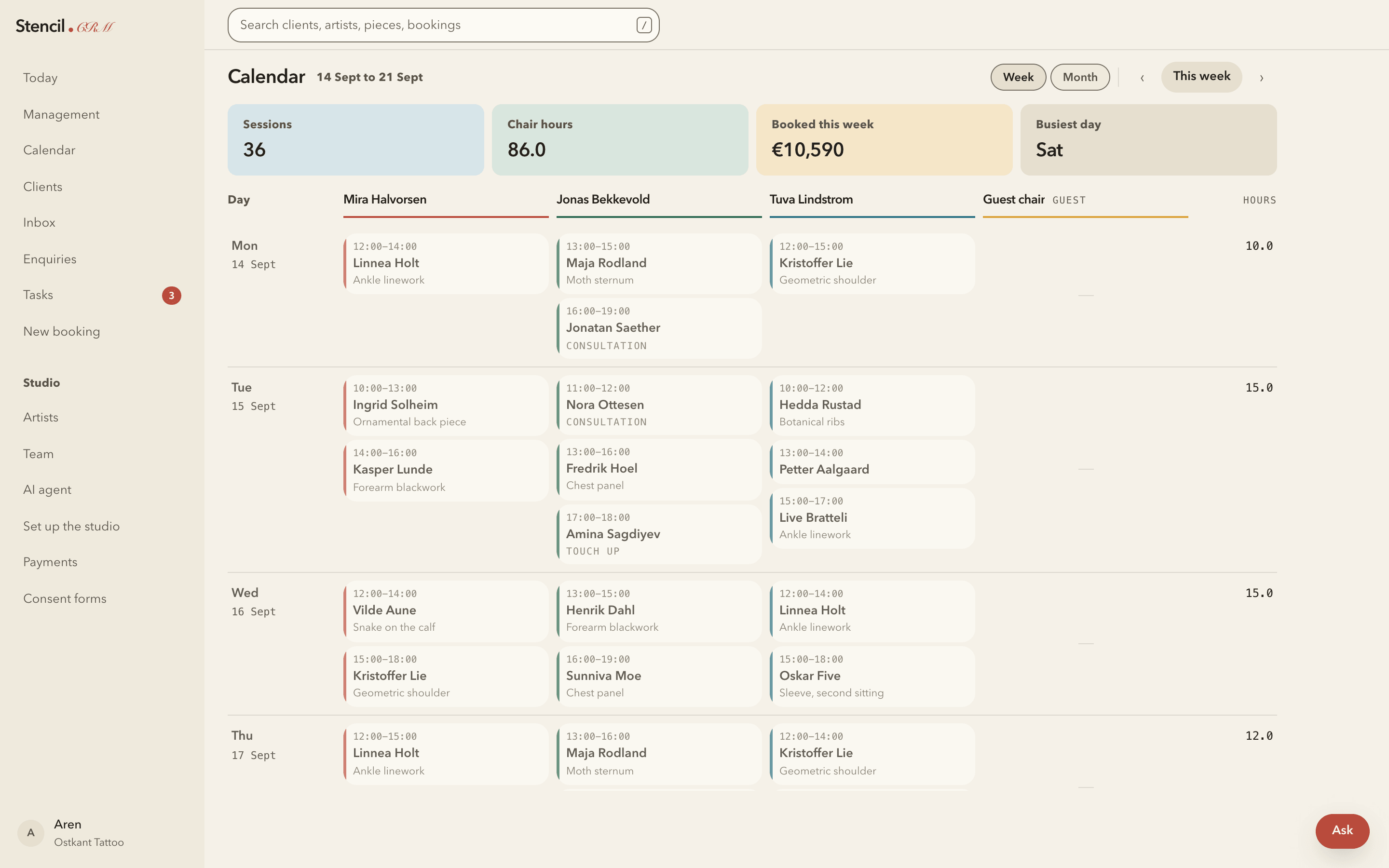
The Stencil calendar, one week across four chairs, each booking showing the time, the client and the piece.
The real interface. Every name shown is seeded example data.

What it does

One studio, nine jobs, one place.

Each of these is a working part of the product today, not a roadmap item.

Day board and calendar

The day drawn as chairs against the studio's own opening hours. Week and month views, and booking straight from the board.

Clients and projects

A record per client, the pieces they are having done, every session against each one, reference images and intake answers.

Instagram inbox

DMs land in the studio's inbox with unread state, beside the website and email enquiries, in the same place as the booking.

An assistant that answers

It replies to enquiries and proposes a slot. It never writes to the diary: somebody approves, and only then is the booking made.

Deposits and payments

Deposits recorded as bookkeeping, commission per artist, booth rent, and a standing list of what is owed and by whom.

Consent forms

Consent captured against the session it belongs to, so it exists before the needle and can be found afterwards.

Artists and team

Two roles, admin and artist. An artist sees their own book and clients, not the studio's money or roster. One person, many studios.

Your rules, not ours

Hours, chairs, commission splits, booth rent and deposit policy are settings. Nothing about how a studio runs is baked into the software.

Search and tasks

One search across clients, artists, pieces and bookings, and a task list for the things the day left behind.

How it works

The software is the argument.

Four screens from the running product, loaded with the example studio that ships with every new account.

The day

The unit is the chair, not the user.

A studio has chairs; artists occupy them. The board is drawn from the hours that studio actually opens, so an empty column is a real gap rather than a rendering quirk.

  • Guest chairs fold awayAn unused chair stops taking up the width it is not earning.
  • Week and month, same boardThe same structure at three zoom levels, so nothing has to be relearned.
  • Built for a phone between sessionsThe day becomes an agenda list on a narrow screen instead of a squeezed grid.
Calendar — week
A week of the Stencil calendar: four chair columns, bookings showing time, client and piece, with hours totalled per day.
Example data. Ostkant is the seeded studio, not a customer.

The enquiry

The DM and the booking are the same thread of work.

Most studio work arrives as an Instagram message at eleven at night from somebody the studio has never met. That message, the client record it becomes, the booking and the deposit are one chain, not four systems.
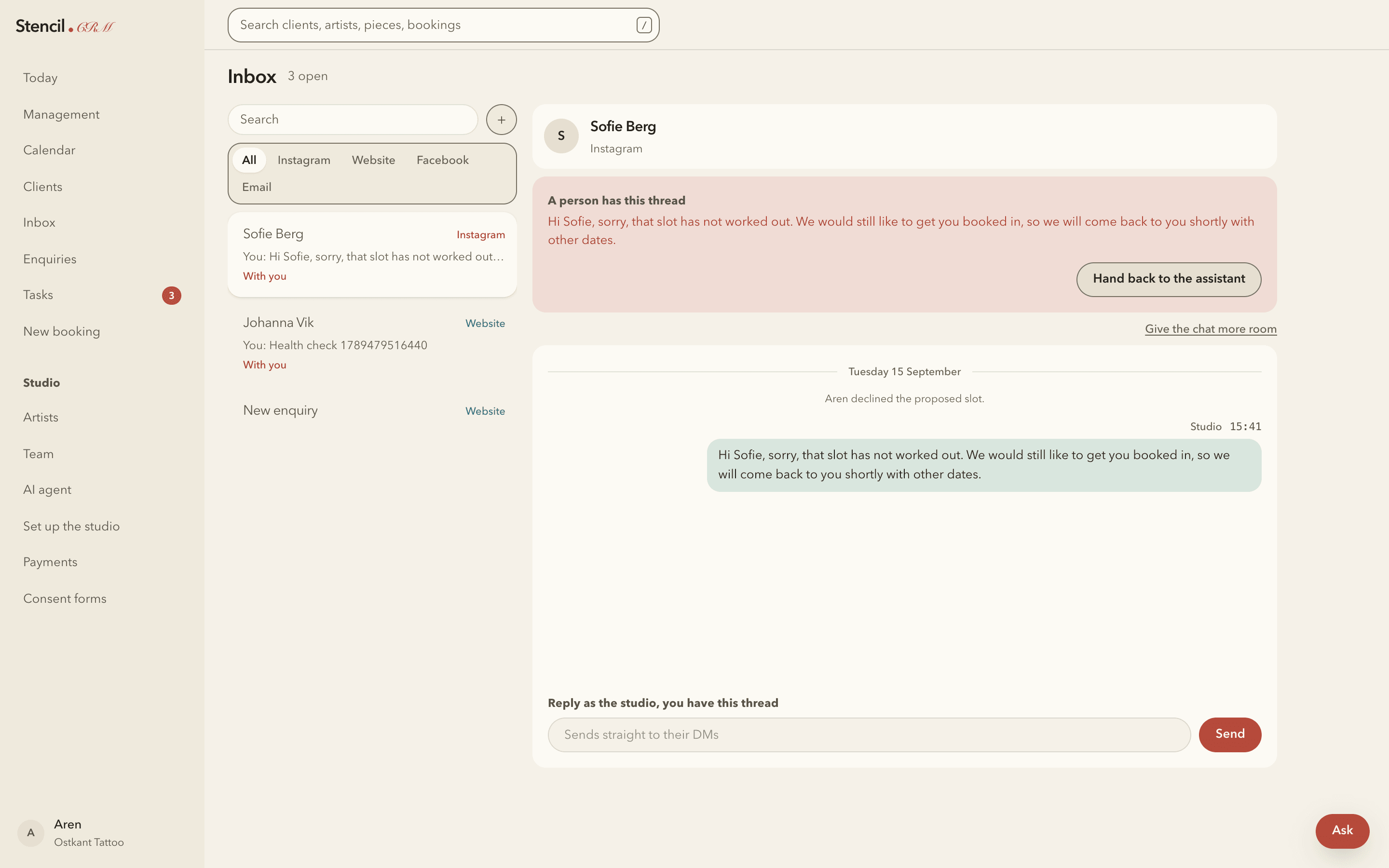
  • The assistant answers firstIt knows the artists, the prices and which slots are genuinely free.
  • A person can take the threadStep in mid-conversation, reply as the studio, hand it back when you are done.
  • It proposes; you decideA proposed slot is only a proposal until somebody approves it.
Inbox
The Stencil inbox: Instagram, website and email threads on the left, an open conversation on the right with a banner reading that a person has taken the thread.
Example data, and a test thread from development.

The money

What is owed, and who owes it.

Commission per artist, booth rent, deposits taken and deposits still outstanding, with the rate stamped onto each session when it completes — so changing a split never rewrites what somebody already earned.
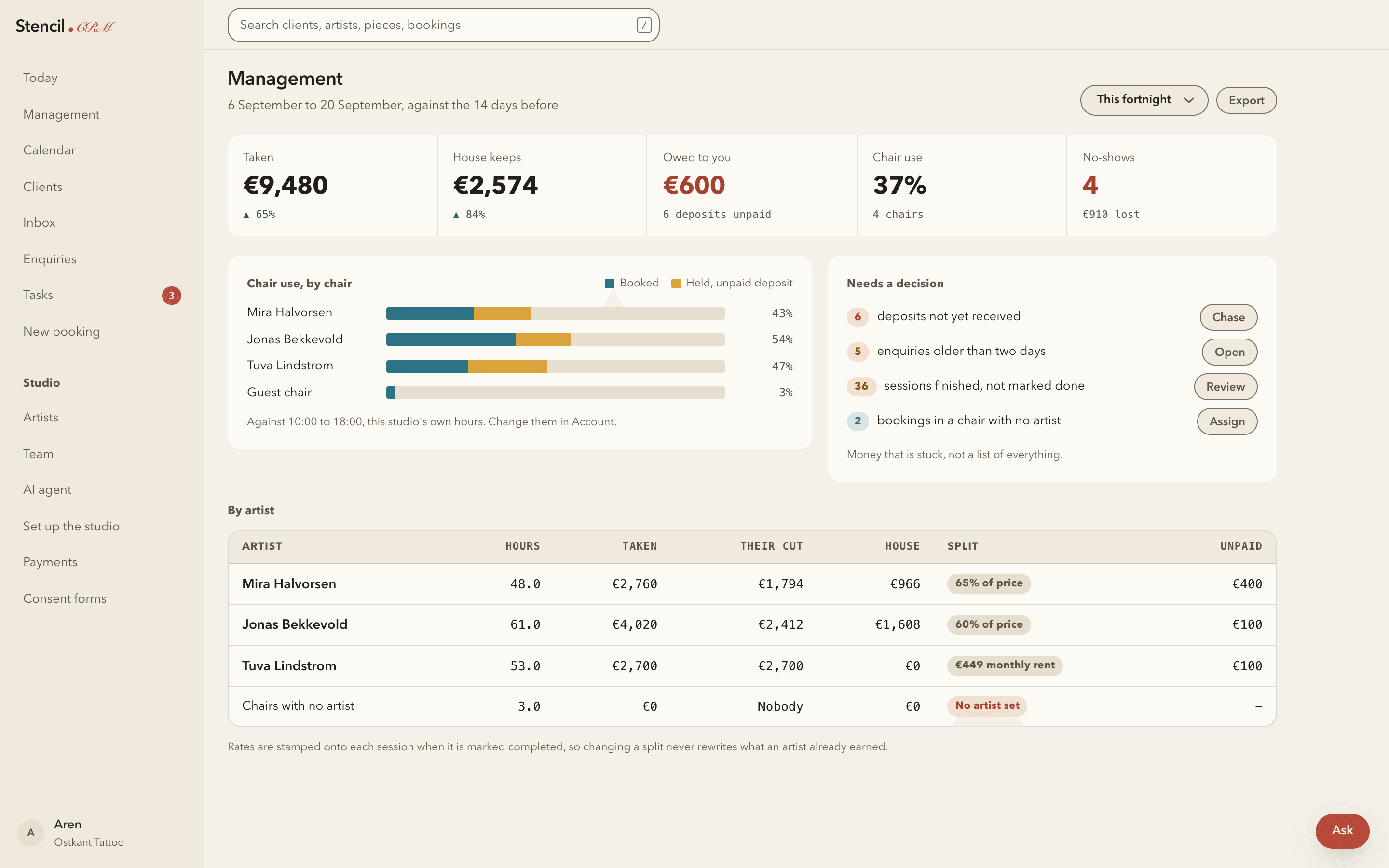
  • Chair use against real hoursMeasured against the studio's own opening times, not a guessed working day.
  • A decision list, not a reportDeposits unpaid, stale enquiries, sessions never closed off, chairs with no artist.
  • Per artist, per splitPercentage or monthly rent, set per artist, shown side by side.
Management
The Stencil management screen: totals taken and owed, chair use per artist as bars, a list headed Needs a decision, and a per-artist table of hours, cut, house share and unpaid amounts.
Example data. Every figure shown is seeded, not a real studio's takings.

The client

Everything about one person, on one page.

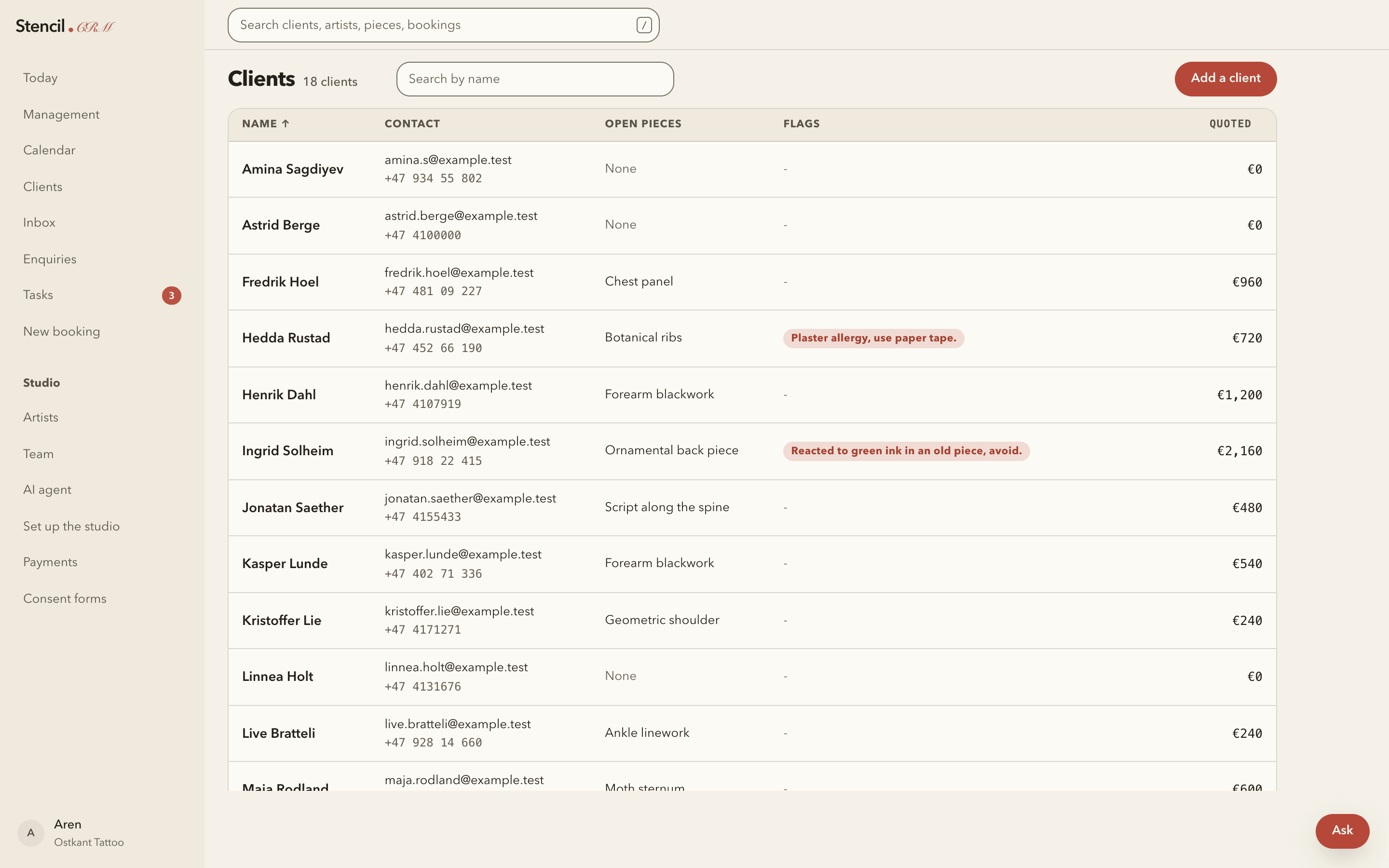
The piece, the sittings it has taken, what was paid and what is still owed, the consent on file and the conversation it all started in.
  • Projects, then sessionsA sleeve is one project with several sittings, not six unrelated bookings.
  • References attachedThe images a client sent live on the record rather than in someone's camera roll.
  • Consent where you will look for itAgainst the session, so it is findable a year later.
Clients
The Stencil clients list, showing client records for the example studio.
Example data. No real client records appear anywhere on this page.

Setting it up

Nobody is running an implementation project.

Studios are small. The whole setup is one page the owner works through at their own desk, and every step checks itself, so it is safe to stop halfway and come back.

  1. 01The studioName, web address, and the hours the day board draws.
  2. 02Who works hereArtists, the chairs they sit in, and a login each if they want one.
  3. 03InstagramConnect the account so a DM reaches the inbox.
  4. 04The assistantIts own key, and the rules about what it may and may not say.
  5. 05The public linksThe enquiry form and the chat, ready to put in a bio.
Start with a studio that already has something in it

A new account can load an example studio — chairs, artists, a week of bookings, clients and payments — so the software can be judged full rather than empty. It removes cleanly when you are finished with it.
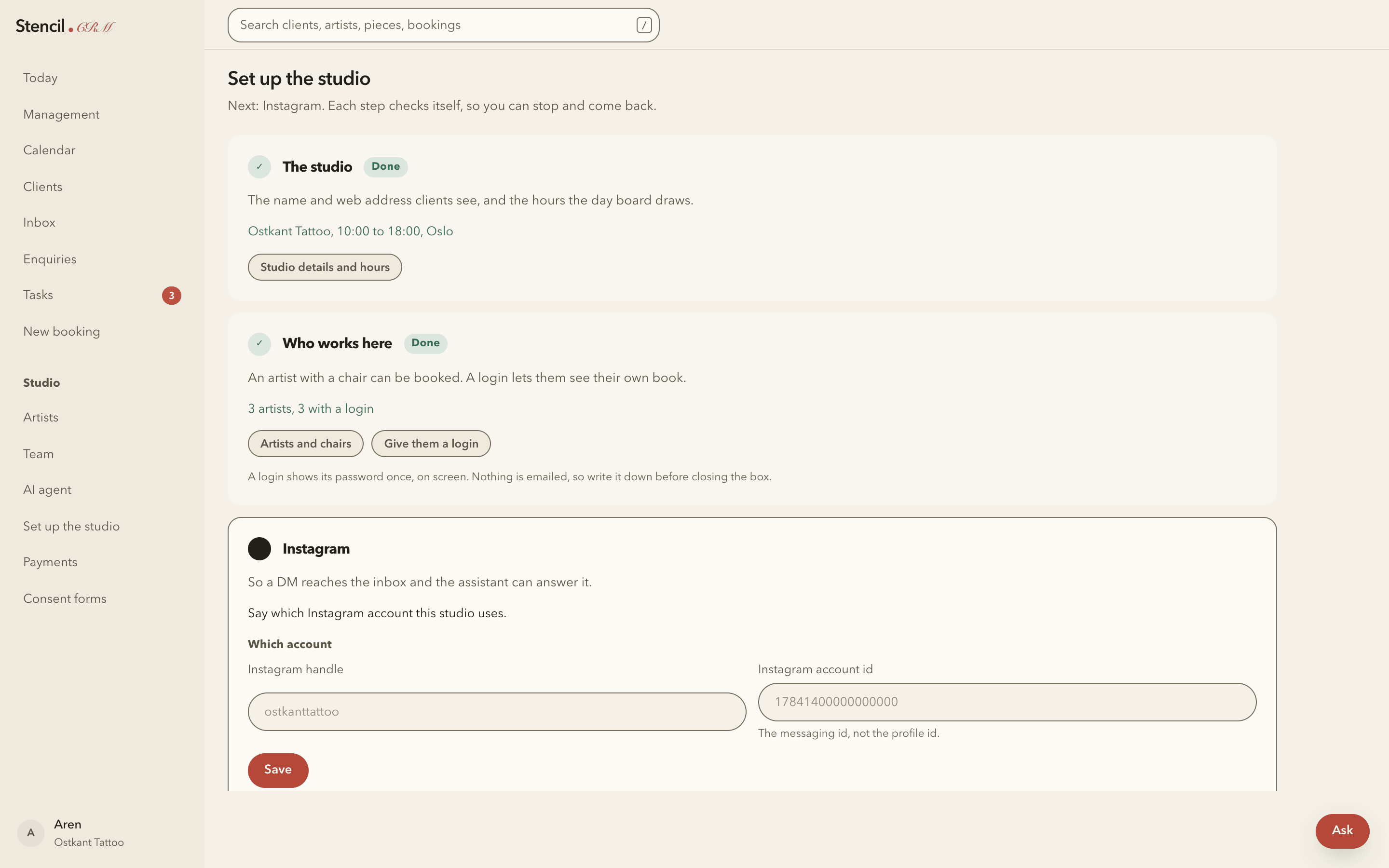
Set up the studio
The Stencil setup page: steps for the studio, who works here, and Instagram, each marked done or awaiting input.
Example data.

Where it stands

Early, and saying so.

Stencil has not launched. There are no customers, no case studies and no pricing, and none of those will be invented here. What follows is the whole picture.

Working today

  • Day board, calendar and bookings
  • Clients, projects, sessions and references
  • Deposits, payments, commission and booth rent
  • Consent forms, enquiries, tasks and search
  • Instagram inbox and the assistant
  • Team logins and multi-studio switching

Not there yet

  • No email is sent. A new login shows its password once, on screen.
  • Instagram needs Meta's review, so only invited test accounts can connect today.
  • No pricing has been set.

Underneath

  • Postgres with row-level security, so studios cannot see each other
  • Support staff work through a separate console, outside those rules
  • Hosted on Vercel and Supabase

Put the diary somewhere it belongs.

Create a studio, load the example data, and see whether it holds up against how yours actually runs.

A contact address is not set up yet.